Table Reads with AI voices
Hear your script read aloud. Improve the writing. Share audio with executives.
INT. WRITER'S ROOM - LATE
The cursor blinks. Then, for the first time, the scene answers back.
WRITER
Okay. Now I can hear what needs to change.
▶Play this sceneTrusted by working storytellers
What Users Say

Dennis Lee Bush
Screenwriter and Playwright
After spending $4,000 on a live table read, I realized just how valuable it is to have a tool like Table Read Studio. It gives me the ability to hear my script come to life, test dialogue in real time, and make immediate changes as I continue shaping the work. Robin and Vaiga have created an incredibly useful application, and I highly recommend it to any writer before committing the time and expense of a live table read.

Luke Abbott
Screenwriter
Top 5% on the Black List
With the ability to create unique voices tailored to each character, to give direction on each line, you can bring your script to life in minutes. It's so useful, I think I'll be returning to this app time and time again.
See It In Action
Your words, finally off the page.
Press play on a scene and follow each performance line by line, exactly as it appears in the reading workspace.
July's Day
INT. PARK - DAY
I can't really tell if this brew is any different. It's supposed to give a slower release of norepinephrine.
I like the taste. What's norepinephrine?
It's like adrenaline. It is adrenaline. It helps you stay alert and...
Beyond the table read
Build the world around the voices.
Mark the script with sound effects, looping ambience, and music cues. Then shape a pitch-ready audio prototype in the same workspace.
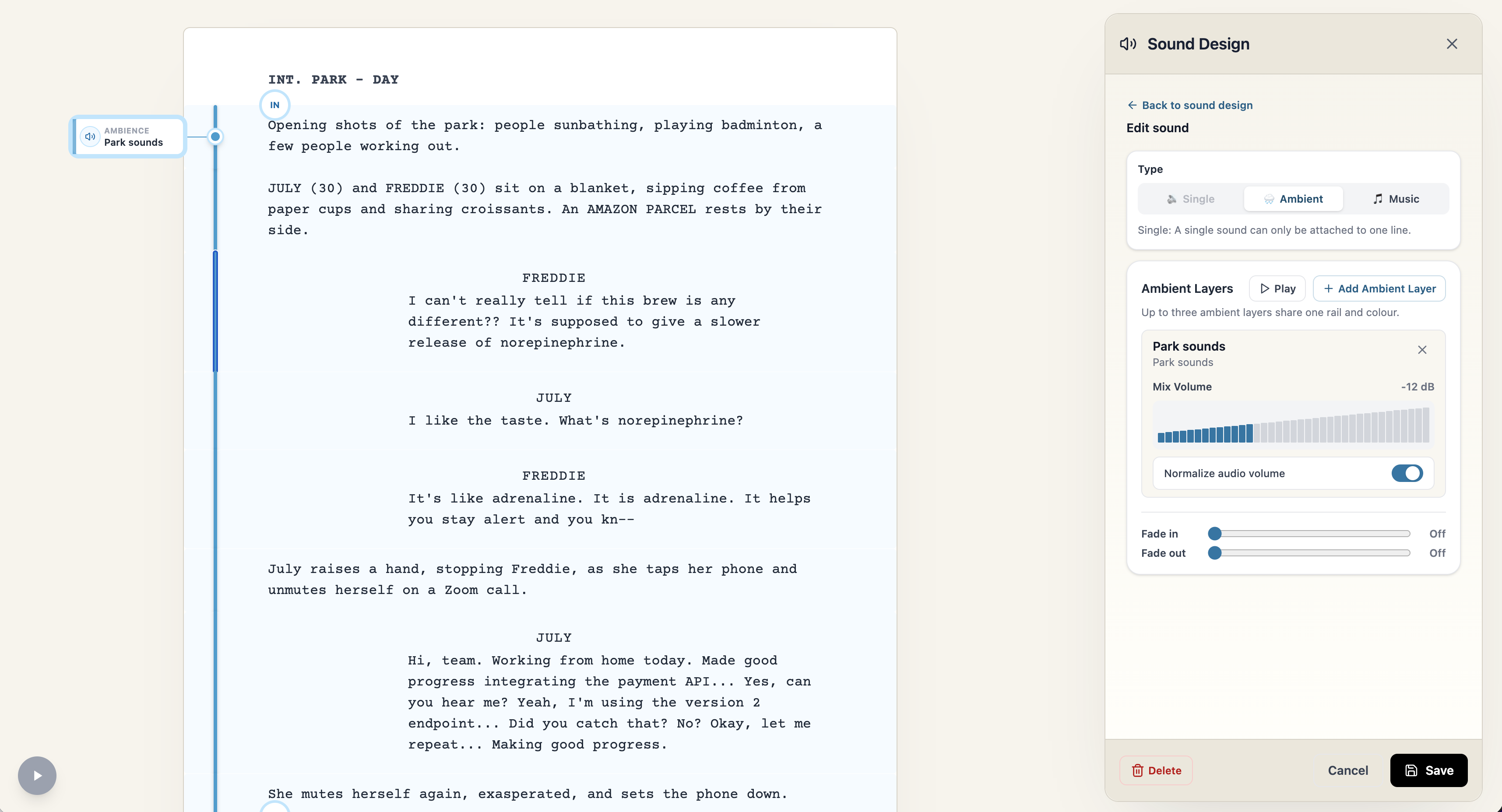
From table read to pitch-ready audio
Shape it. Mix it. Share it.
A table read lets you hear what is working. Sound design turns that read into an audio prototype that can carry the world, tone, and rhythm of the screenplay into the room.
Add sound effects
Place one-shot effects and looping ambience exactly where they belong in the script.
Layer in music
Add music cues to explore tone, tension, and the emotional shape of a scene.
Share the prototype
Export voices, SFX, and music as audio for a pitch or a more vivid way to share your screenplay.
A clear path from page to performance
How It Works
- 01
Import Your Script
We support Final Draft and Fountain screenplays
- 02
Pick voices for your characters
Choose voices that fits different types of characters
- 03
Listen to Table Read
Give acting directions if you like to control pacing, emotion and delivery
- 04
Download AudioWriter plan
Save an audio version of your script, to listen on the go or give to execs
Made for the rewrite
Why Table Read Studio
Reason 01
Frequent live table reads are costly and hard to organize
Nothing beats a real table read. But coordinating schedules and booking spaces takes time and money. Table Read Studio lets you hear pages whenever you like, at a fraction of the cost.
Reason 02
Silent read-throughs miss issues with pace, tone, and dialogue
Hearing voices exposes clunky exposition, and uneven rhythm long before you gather a live cast.
Reason 03
AI table reads give you a shorter feedback loop
You'll know whether your scenes are working before sending your script to anyone. Do reads after each draft, or for individual scenes as you write.
Reason 04
Strengthen your pitch to executives with a polished audio version of your script
Executives struggle to find time to read but they do have time to listen. And they're used to old-fasioned robotic text-to-speech. Send them a table read of your script to stand out.
Meet the Team
Built with passion by a small team. We personally answer every support query, so you can get the most out of Table Read Studio.

Vaiga
Filmmaker, Developer

Robin
Developer, Writer
Frequently Asked Questions
What is Table Read Studio?
Table Read Studio lets you run table reads with AI voice actors. It's great for screenwriters wanting to improve their script quicker, and for actors recording self-tapes.
How can I hear my screenplay out loud?
Import your Final Draft or Fountain screenplay, choose an AI actor for each character, and press Play. You can listen to your screenplay as a realistic AI table read, so you hear dialogue, pacing, and tone while you rewrite.
How does it work?
It's very easy to use. Import your screenplay. For each character, choose an AI voice or that you would like to read the character yourself. Then just press Play.
Does AI read all the characters?
It's up to you. You can pick AI voices for each character, or read some characters yourself.
What about narration?
You can select whether to include narration in your table read, or to only read dialogue. If you would like narration you can choose an AI voice and tell it whether to read scene headings, actions and transitions. It's all easily configurable.
Can I cancel anytime?
Yes, you can cancel your subscription at any time. Your subscription will remain active until the end of the month you signed up for. There are no cancellation fees.
Are my scripts secure and confidential?
Yes. Your scripts are stored securely on our servers and protected using industry-standard security practices. We treat your content as confidential, do not share it with third parties, and limit access to what is necessary to provide and maintain the service.
Can I download an audio of the table read?
Yes. On Writer and Studio plans you can download the audio of your table read.
Does it work on mobile?
Absolutely! The whole app is designed to work on either desktop or mobile.
Do you store my card details?
No. All payments are handled by Stripe, which is used by millions of companies online. We never store or have access to your card details.
I'm an actor. Can I use this for self-tapes?
For actor-focused workflows, recording, and scene partner voices, head to Self-Tape Studio.
Your next draft starts with a listen.
Upload your screenplay and hear the dialogue, pacing, and character voices in minutes.